
Age of Learning Universal Login

Project Vision
Age of Learning needed one unified login experience for students, teachers, and caregivers across multiple school-licensed learning products.
The legacy experience relied heavily on credentials and created friction for young learners, extra work for teachers, and account confusion on shared devices. The goal was to create a secure, role-based system that helped young students access learning more independently while giving adults the security and control their roles required.
Challenges
1) Young students couldn’t log in independently. Traditional credentials required reading, recall, and accurate typing, while students often depended on teachers to recover from errors.
2) Login friction created extra work for teachers. Repeated logins, password recovery, and authentication errors required frequent assistance and took time away from learning.
3) Shared devices caused account mix-ups. Students lacked a clear indication of whose account was active, and incomplete logout could record activity under the wrong student profile.
Design Goals
The goal was to create a login system that worked for users with very different needs.
For students, the experience needed to be simple, visual, fast, and easy to complete independently.
For teachers and caregivers, it needed to provide secure access, clear account control, and support for school authentication systems.
The challenge was to bring these needs together within one consistent login experience.
Research & Exploration
To understand where the existing login experience was breaking down, I combined usage data, bug reports, user testing, team input, and technical feasibility research.
The research showed that young learners needed an experience that reduced reading, typing, and recall while still working reliably in real classroom environments.
I explored and compared three low-friction login approaches:
Voice Pass
Students say a short passphrase, and voice-recognition software authenticates the user.
Short-Code PIN
Students enter a short four-digit classroom code provided by the teacher, then select their own profile from a list.
QR Code
Each student receives a unique QR badge. Scanning the badge identifies the student’s account and starts the login flow.


Voice Pass
Noisy classrooms reduced recognition accuracy, and using voice for authentication also raised privacy concerns.
Short-Code PIN
It still required typing and profile selection, which increased errors, account mix-ups, and the need for teacher assistance.
QR Code
Compared with the other approaches, QR login provided the strongest fit for student independence, non-reader accessibility, speed, and reliability.
QR Simplified Login — But Introduced New Challenges
QR removed the need for usernames and passwords, but it also introduced new risks that had to be solved before the experience could work reliably in real classrooms.
Wrong student access
Another student could scan someone else’s badge.
-
Solution: Add a Visual Passkey as a lightweight second layer of protection.
Shared-device sessions
Incomplete logout could leave the previous student’s account active.
-
Solution: Add persistent identity cues, teacher-controlled class logout, and automatic logout after inactivity.
Scanning failures
Camera permissions, poor lighting, or positioning could interrupt authentication.
-
Solution: Add clear scan guidance and actionable error states.
Lost or damaged badges
Students needed a fallback when their badge wasn’t available.
-
Solution: Provide teacher-assisted recovery and badge replacement.
Accessibility & recovery
Young learners still needed help understanding setup, errors, and next steps.
-
Solution: Add audio guidance and visual feedback throughout the flow.
CHALLENGE 1
Making Login Work for Young Learners
Selecting QR solved the typing and credential problem, but the experience still had to be simple enough for young students to use with minimal help.
I designed the flow around clear visual steps, recognizable identity cues, audio guidance, and a predictable path from scan to learning. First-time users could receive support during setup, while returning students could move through the experience quickly and more independently.
Solution
Students could scan a unique QR badge to identify their account without entering a username or password.
The QR flow was designed to become fast and independent after initial setup, while recognizing that first-time access might still require teacher support.

CHALLENGE 2
Protecting Student Accounts on Shared Devices
QR made login much easier, but it introduced new challenges.
Another student could scan someone else's badge, incomplete logout could leave the previous account active, and students needed a way to recognize that they were entering the correct profile.
Solution
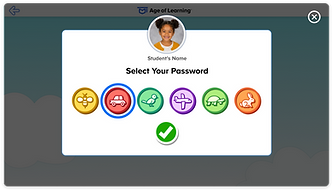
I added a Visual Passkey as a lightweight layer of protection.
After scanning their QR badge for the first time, students selected a memorable image as their personal passkey. Returning students scanned their badge, selected their saved image, and continued into the product portal.
Student photos and names also remained visible on key screens, helping users recognize which account was currently active. Audio guidance supported non-readers throughout the experience.

CHALLENGE 3
Supporting Teachers Without Slowing Down Students
Teachers needed a very different authentication experience.
Unlike students, they needed secure access to student records, progress, assignments, and administrative tools, along with support for district authentication systems and classroom controls.
Solution
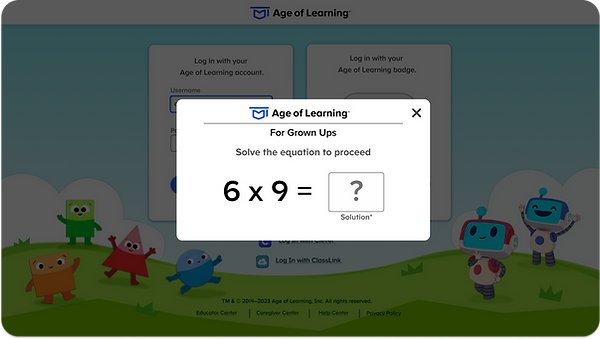
The teacher experience retained secure credential login while adding support for district SSO.
Teachers could also print student QR badges and securely log out an entire class from the educator portal, giving them greater visibility and control over classroom sessions.


Creating a Framework
Research showed that a single login method would not work equally well for every user.
I created a role-based authentication framework that directed each user to the right experience:
-
Students: low-friction QR access designed for young learners
-
Teachers: secure credentials or district SSO
-
Caregivers: secure credential login
This gave all users one shared entry point while allowing each role to follow the authentication method that best matched their needs.
Web User Flow

App User Flow

Visual Design
The interface was intentionally simplified to reduce visual and cognitive complexity.
Credential and QR login were placed front and center so users could immediately identify the primary paths.
Unnecessary text and secondary content were removed, while familiar Age of Learning characters added warmth without competing with the main actions.
Design Principles
Prioritize primary actions
Make the main login choices immediately visible.
Reduce cognitive load
Use limited text and one clear action at a time.
Make it familiar
Use recognizable characters and visual cues without distracting from the task.

Recognition + Protection
Young learners needed both guidance and reassurance as they moved through the flow.
Student photos and names remained visible on key screens, helping students recognize the correct account.
Audio guidance and feedback supported non-readers through setup, login, errors, and recovery.


From Login to Learning
After authentication, students entered their own portal and could move directly into their assigned learning experiences.
The goal was to make authentication feel like a short, predictable step toward learning rather than a task students had to struggle through first.

The Solution
The final Universal Login system combined multiple authentication methods into one role-based experience.
Students
-
QR Badge → Visual Passkey → Learning Portal
Teachers with District Accounts
-
District SSO → Educator Center
Teachers & Caregivers
-
Secure Credentials → Role-Specific Experience
The result was a system that gave young learners low-friction access while preserving the security and control required for adult users.




Final Takeaway
We weren't redesigning a login page—we were designing an authentication system that allowed young children to access learning independently while giving adults the security and control their roles required.